You can't take a screenshot with --headless. Headless mode uses a dummy renderer, so the viewport has no image to read, and a script that waits for a drawn frame never finishes. Run Godot with a real renderer on a virtual X display instead:
xvfb-run -a godot --path . -s tools/screenshot.gd -- res://main.tscn shot.png
The tools/screenshot.gd script is below. Without a GPU, Mesa's llvmpipe software renderer draws the frame, so the same command works in containers and CI jobs.
What this was tested with
Godot 4.7.2 on Arch Linux with Xvfb, and the official Godot 4.7.2 Linux binary in a clean ubuntu:noble Docker container. Both drew the scene with llvmpipe through Vulkan, and the two PNG files were byte-identical.
The example scene
project.godot:
config_version=5

[application]
config/name="Screenshot demo"
run/main_scene="res://main.tscn"

[display]
window/size/viewport_width=640
window/size/viewport_height=360
main.tscn draws a blue background, a red square and a label:
[gd_scene format=3]

[node name="Main" type="Node2D"]

[node name="Background" type="ColorRect" parent="."]
offset_right = 640.0
offset_bottom = 360.0
color = Color(0.1, 0.2, 0.45, 1)

[node name="Box" type="ColorRect" parent="."]
offset_left = 270.0
offset_top = 130.0
offset_right = 370.0
offset_bottom = 230.0
color = Color(0.9, 0.2, 0.2, 1)

[node name="Label" type="Label" parent="."]
offset_left = 20.0
offset_top = 20.0
offset_right = 320.0
offset_bottom = 60.0
text = "Hello from Godot"
The screenshot script
Save this as tools/screenshot.gd:
extends SceneTree

func _initialize() -> void:
	var args := OS.get_cmdline_user_args()
	if args.size() != 2:
		push_error("Usage: godot --path . -s tools/screenshot.gd -- res://scene.tscn out.png")
		quit(2)
		return
	root.add_child(load(args[0]).instantiate())
	# Wait until the scene has been drawn at least once.
	await process_frame
	await RenderingServer.frame_post_draw
	var image := root.get_texture().get_image()
	if image == null or image.is_empty():
		push_error("The viewport has no image. Is Godot running with --headless?")
		quit(1)
		return
	var err := image.save_png(args[1])
	if err != OK:
		push_error("save_png failed: %s" % error_string(err))
		quit(1)
		return
	print("Saved %dx%d screenshot to %s" % [image.get_width(), image.get_height(), args[1]])
	quit()
-s runs the script instead of the main scene. Godot ignores everything after -- and passes it to the script through OS.get_cmdline_user_args(). The script adds the scene to the root viewport, waits for RenderingServer.frame_post_draw so the frame has been drawn, then saves the viewport's image. It exits with a non-zero code if anything goes wrong, so a CI job fails instead of passing without a screenshot.
Run it
Import the project once, then take the screenshot:
godot --headless --path . --import
xvfb-run -a godot --path . -s tools/screenshot.gd -- res://main.tscn shot.png
Output:
Vulkan 1.4.354 - Forward+ - Using Device #1: Unknown - llvmpipe (LLVM 23.1.4, 256 bits)
Saved 640x360 screenshot to shot.png
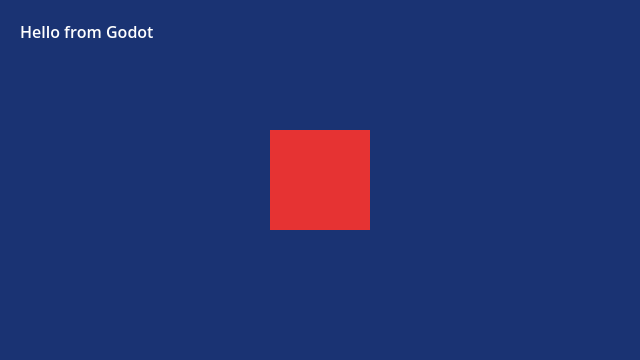
Godot also printed Failed to create wd.xic and No DRI3 support detected warnings under Xvfb. Neither stopped the screenshot.
Why --headless can't do this
--headless is short for --display-driver headless --audio-driver Dummy, and godot --help lists dummy as the only rendering driver for the headless display driver. Nothing is drawn, so there is nothing to capture.
With --headless, screenshot.gd waited on frame_post_draw until I stopped it after 120 seconds. A separate probe that skipped the wait and read the image directly printed this. The viewport texture exists, but the dummy renderer has no image behind it:
rendering method: forward_plus
display server: headless
viewport texture: ():<ViewportTexture#-9223372010665540161>
ERROR: Parameter "t" is null.
   at: texture_2d_get (./servers/rendering/dummy/storage/texture_storage.h:110)
   GDScript backtrace (most recent call first):
       [0] _initialize (res://tools/headless_probe.gd:11)
image: <Object#null>
Pick one renderer for saved screenshots
--rendering-driver opengl3 also works under Xvfb. It uses the Compatibility renderer on OpenGL instead of Forward+ on Vulkan:
xvfb-run -a godot --path . --rendering-driver opengl3 -s tools/screenshot.gd -- res://main.tscn shot-opengl3.png
The two screenshots look the same but aren't identical. 219,859 of the 230,400 pixels differed, by at most 1 per colour channel. If you compare screenshots against saved ones, take both with the same renderer or allow a small tolerance.
Bigger screenshots
--resolution 1280x720 gives a 1280x720 image. With the default stretch mode, though, the 640x360 scene stays in the top-left corner and the rest is grey. To scale the scene to the window, add this line under [display] in project.godot:
window/stretch/mode="canvas_items"
Then:
xvfb-run -a godot --path . --resolution 1280x720 -s tools/screenshot.gd -- res://main.tscn shot-1280.png
Many frames: Movie Maker mode
Movie Maker mode runs the main scene at a fixed frame rate and saves every frame. With a .png file name it writes numbered PNG files plus a WAV file:
mkdir -p frames
xvfb-run -a godot --path . --write-movie frames/frame.png --fixed-fps 30 --quit-after 3
This wrote frame00000000.png, frame00000001.png, frame00000002.png and frame.wav. Two things to know:
- Create the folder first. Without it, Godot logged
ERROR: Condition "d.is_null()" is true. Returning: FAILED, still printedDone recording movie, exited with code 0 and wrote nothing. An open pull request proposes aborting in this case: https://github.com/godotengine/godot/pull/95867 - It needs a renderer too. With
--headless, Movie Maker crashed with signal 11 on Godot 4.7.2.
In Docker or CI
In a clean ubuntu:noble container, these packages were enough for the official Godot binary to draw with Xvfb:
apt-get update
DEBIAN_FRONTEND=noninteractive apt-get install -y xvfb xauth libgl1 libgl1-mesa-dri libfontconfig1 libxcursor1 libxinerama1 libxrandr2 libxi6
I didn't try to trim the list. Godot printed warnings about missing sound and D-Bus libraries, fell back to a dummy audio driver and saved the screenshot. In one of six container runs, xvfb-run hung before Godot started, so give the CI step a time limit.
Compare against a saved screenshot
ImageMagick's compare exits with 0 when two images match and 1 when they don't, which is enough for a CI check:
magick compare -metric AE -fuzz 1% baseline.png shot.png diff.png
diff.png marks the pixels that changed. Moving the red square 10 pixels to the right made it exit with 1. The Vulkan and OpenGL screenshots exited with 1 without -fuzz 1% and with 0 with it. This used ImageMagick 7.1.2.
Letting an AI app look at the running game
If you want Claude Code, Cursor or another MCP app to run the game and check the result itself, Ziva's run_scene tool runs a scene, can send keys and mouse clicks, and returns a screenshot of the running game with its console output and errors. It works through the Godot editor with Ziva installed in the project, uploads its screenshots to Ziva and needs a Ziva account. The free Hobby plan works. Details: https://ziva.sh/docs/ziva-mcp-server . The author is a cofounder of Ziva.
Related
To run unit tests from the command line, see How to run Godot unit tests from the command line with GUT and GdUnit4: https://www.openredsoftware.com/blog/run-godot-unit-tests-command-line/
Sources: Godot command line reference https://docs.godotengine.org/en/stable/tutorials/editor/command_line_tutorial.html , Godot Movie Maker docs https://docs.godotengine.org/en/stable/tutorials/animation/creating_movies.html and OS.get_cmdline_user_args() https://docs.godotengine.org/en/stable/classes/class_os.html#class-os-method-get-cmdline-user-args .